
Download Macromedia HomeSite – Classic HTML & XML Editor for Windows
Overview
Macromedia HomeSite is a time‑tested development editor that has earned a loyal following among web designers and programmers who value speed, flexibility, and a low‑footprint tool for creating HTML, XML, and related markup languages. First released in the late 1990s, HomeSite’s latest trial version, 5.5, was updated on August 8 2005 and continues to run on Windows 98 and earlier Windows platforms. Although the software is now considered “classic,” it still offers a powerful, code‑centric environment that contrasts sharply with today’s visual‑first editors. The trial edition is free to download, runs in English, and is packaged in a small installer that takes up considerably less storage than many modern development suites. Over 78,000 users have downloaded HomeSite since its addition to the software catalog in 2005, with a steady flow of downloads from the United States, Russian Federation, and Ukraine. For developers who need a lightweight, secure, and highly configurable editor, HomeSite remains a compelling choice.
Key Features and Core Capabilities
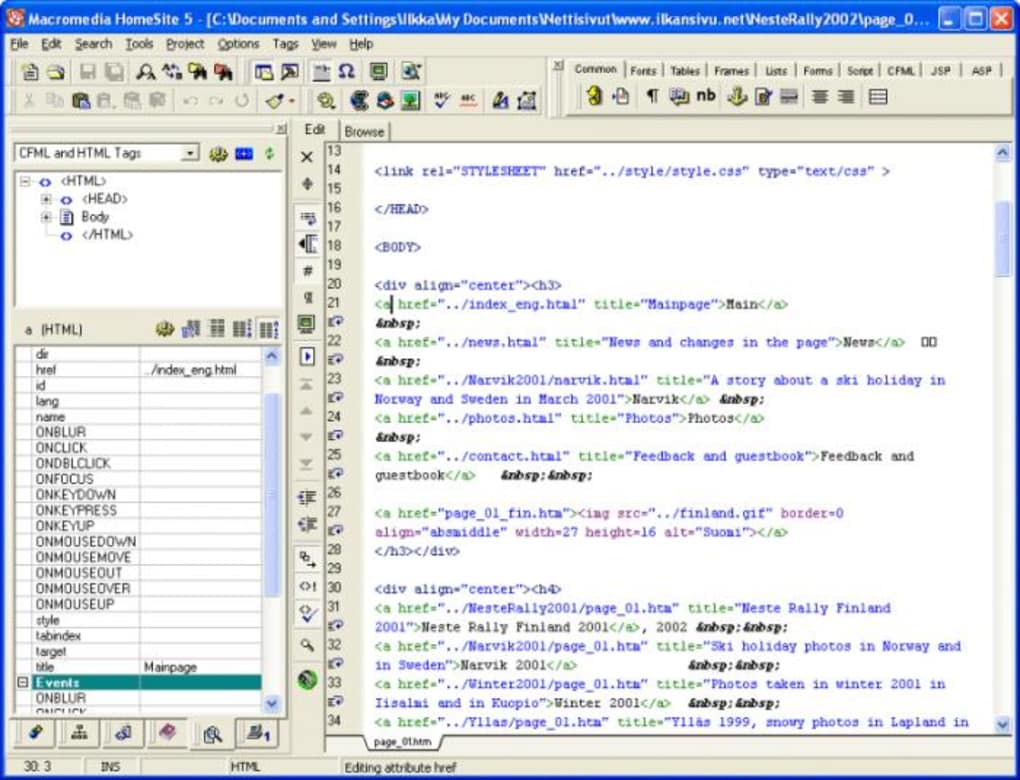
- Fast, keyboard‑driven editing: HomeSite’s command‑center interface lets power users execute almost any action without leaving the keyboard, dramatically speeding up coding sessions.
- Customizable toolbars and menus: Users can tailor the UI to match personal workflows, adding or removing buttons, defining shortcuts, and creating macro scripts.
- Integrated FTP/SFTP client: Directly upload, download, and synchronize files with remote servers, eliminating the need for external FTP tools.
- Code snippets and templates: Pre‑built HTML, CSS, JavaScript, and XML snippets accelerate repetitive tasks while ensuring consistency.
- Syntax highlighting and validation: Real‑time color coding for tags, attributes, and scripts helps spot errors early, and built‑in validators check markup against standards.
- Project management: Organize files into logical groups, set project‑wide preferences, and switch contexts with a single click.
- Extensibility through plug‑ins: A vibrant community has created plug‑ins for version control, CSS frameworks, and even integration with early versions of Dreamweaver.
- Low system overhead: The application’s modest memory and CPU footprint makes it ideal for older machines still running Windows 98 or Windows 2000.
Why These Features Matter Today
Even though modern web development often relies on heavy IDEs and cloud‑based editors, the principles behind HomeSite’s feature set remain relevant. Fast keyboard shortcuts reduce context switching, while built‑in FTP removes the friction of deploying changes. For freelancers and small agencies that need a reliable, offline tool without a subscription model, HomeSite’s combination of speed, simplicity, and extensibility provides a pragmatic alternative to resource‑hungry competitors.
Installation, First‑Run Setup, and Compatibility
Step‑by‑Step Installation Guide
Downloading and installing the trial version of Macromedia HomeSite is straightforward:
- Visit the official download page and click the Download HomeSite 5.5 Trial button.
- Save the
HomeSite55Setup.exefile to a convenient location on your Windows 98 (or later) machine. - Run the installer. You will be greeted by a classic Windows Setup wizard that asks for the destination folder; the default
C:\Program Files\HomeSiteworks well. - Accept the license agreement and choose the “Typical” installation option to install core components, or “Custom” if you wish to skip optional plug‑ins.
- After installation, launch HomeSite from the Start menu. The first‑run dialog offers to import settings from older versions of HomeSite or other editors; you can skip this if you are a new user.
- The trial period lasts for 30 days, after which the software will prompt you to purchase a full license if you wish to continue using it.
Operating System Support
Macromedia HomeSite 5.5 is officially supported on Windows 98, Windows ME, Windows 2000, and early releases of Windows XP. Because the program relies on the legacy Win32 API, it runs smoothly on older hardware and does not require .NET Framework or recent service packs. Users attempting to install HomeSite on Windows 7 or newer may encounter compatibility warnings, but the application can often be run in “Windows 98 Compatibility Mode” with acceptable performance.
First‑Run Tips for a Secure Workflow
Once HomeSite is open, consider the following to keep your environment secure and efficient:
- Configure the built‑in FTP client with secure SFTP credentials instead of plain FTP whenever possible.
- Set up automatic backups of your project folders; HomeSite does not include version control, so external tools like CVS or Subversion are recommended.
- Customize the color scheme for syntax highlighting to improve readability on your monitor.
- Disable the “Check for updates” feature if you are on an isolated network; the trial version checks a now‑defunct URL, which can cause delays.
Pros and Cons, Frequently Asked Questions, and Expert Review
Pros
- Lightning‑fast, keyboard‑centric interface ideal for power users.
- Very low memory and CPU usage; runs comfortably on legacy Windows systems.
- Built‑in FTP/SFTP eliminates the need for separate file‑transfer applications.
- Highly customizable toolbars, menus, and macro support.
- Free trial provides full functionality for 30 days.
Cons
- Outdated UI may feel archaic to users accustomed to modern IDEs.
- Lacks integrated version control; requires external tools for Git/SVN.
- No native support for newer web standards like HTML5, CSS3, or ES6 JavaScript.
- Limited documentation; most resources are community‑driven and dated.
- Compatibility issues on Windows 7/10 without compatibility mode adjustments.
FAQ
Can I use HomeSite for modern HTML5 development?
HomeSite 5.5 does not include built‑in HTML5 validation, but you can still write HTML5 markup manually. Syntax highlighting will treat new tags as generic elements, so you’ll need external validation tools.
Is the trial version fully functional?
Yes. The 30‑day trial provides access to all features, including FTP, macros, and plug‑in support. After the trial expires, the program will continue to run in a read‑only mode unless a license is purchased.
How does HomeSite handle CSS editing?
HomeSite offers basic CSS syntax highlighting and code completion via plug‑ins. However, it does not provide visual design tools or live preview, so you’ll need a browser for styling feedback.
Can I run HomeSite on Windows 10?
While not officially supported, many users report success by launching HomeSite in “Windows 98 Compatibility Mode” and disabling UAC prompts. Expect occasional UI glitches.
Is there a way to extend HomeSite with modern tools?
Yes. The plug‑in architecture allows community‑created extensions. You can integrate external linters, Git clients, or even launch external browsers for live previews via custom macros.
Expert Review Summary
Rating: 4/5
Macromedia HomeSite remains a solid, no‑frills code editor for developers who value speed over visual flair. Its lightweight footprint, powerful FTP integration, and deep customizability make it a standout for legacy Windows environments. However, the lack of modern standards support and the dated interface may deter newcomers. Overall, HomeSite is a reliable workhorse for seasoned coders seeking a focused, keyboard‑driven experience.
Conclusion & Call to Action
If you are looking for a free, secure, and fast HTML/XML editor that runs on older Windows machines, the Macromedia HomeSite trial is worth a download. Its classic design encourages a disciplined, code‑first workflow, and the built‑in FTP client streamlines site publishing without extra software. While it lacks the polish of modern IDEs, HomeSite’s efficiency and low resource usage can boost productivity for developers who prefer the keyboard over the mouse. Download the HomeSite 5.5 trial today, explore its customizable environment, and decide whether this timeless tool fits your web‑development arsenal.







